IT Infrastructure Basics
While learning about IT infrastructure, I found a very well-organized article and studied while reorganizing it!
References: futurecreator.github.io
1. What is IT Infrastructure?
What is IT Infrastructure?
The foundation of a system including
hardware,OS,middleware,network, etc. needed to run an applicationRelated to non-functional requirements
Functional Requirements and Non-Functional Requirements
Functional requirementWhat functions the system has and what it can do
Non-functional requirementRequirements such as system performance, stability, security, etc.
Components of Infrastructure
Hardware (HW)
Server hardware, storage for data, power supplies, etc.
In a broader sense, this also includes data center facilities where hardware is installed
Network
Tools that connect servers so users can access them remotely
ex)
Network equipment such as routers, switches, firewalls
Cable wiring connecting them
Access points (AP) needed for users to connect wirelessly from terminals
Operating System (OS)
Basic software for controlling
hardwareandnetwork equipmentManages resources and processes
Client OSFocuses on making it easy for users to use
ex) Windows, macOS
Server OSFocuses on running systems quickly and stably
ex) Linux, Unix, Windows Server
Middleware
Software that provides functionality to make the server perform a specific role on the server
2. On-premises vs Cloud
2-1. On-premises
The traditional approach of placing servers in a data center or server room and managing them directly
Required purchasing, installing, and managing servers, network equipment, OS, storage, various solutions, etc.
Disadvantages of On-premises
Equipment is expensive, so initial investment costs are high
Difficult to estimate usage, so once built, maintenance costs remain the same even with low usage
2-2. Public Cloud
A system provided as a service to an unspecified majority through the internet
What does
service formmean?Users select desired options and pay for what they use
ex) IaaS (select VMs or storage with desired specs, pay based on usage time or data volume), PaaS, SaaS
Cloud Providers like AWS, Microsoft Azure, GCP own data centers and infrastructure
2-3. Private Cloud
A form of Public Cloud with limited users
ex) Internal corporate services - Good security, easy to add proprietary features or services
2-4. Pros of Cloud
Cloud is advantageous for systems with high traffic variability
Why?
Because it is not easy to predict traffic for external services!
Estimating server specs or network bandwidth based on traffic volume is called Sizing, which is quite a difficult task
Cloud systems have
Auto Scalingthat automatically scales based on traffic fluctuation, making it more advantageous than On-premises!
Even if a data system goes down due to natural disasters, the system can be operated from elsewhere
How?
Because cloud data centers are spread around the world!
Cloud is also advantageous for systems that need to provide services quickly or PoC (Proof of Concept)
Also advantageous for startups / individual developers with low initial investment!
2-5. Pros of On-premises
Both On-premises and Cloud guarantee availability, but there is a difference in concept
On-premisesAims for servers not to go down
CloudIn a distributed environment with many instances, if an instance goes down, another instance quickly replaces it
In other words, using Cloud does not guarantee availability; you must design it to increase availability yourself
Therefore, On-premises is advantageous for systems that must never be interrupted even briefly or need availability beyond what cloud providers guarantee...
That being said, I can't quite agree with this part..!
Taking Amazon RDS as an example, there are many methods that come to mind right now, such as using multi-AZ deployments for failover, provisioning and maintaining synchronous standby replicas in other availability zones, etc., to increase availability!!
I wonder if On-premises can guarantee availability beyond what Cloud can offer! I should look into it
On-premises is advantageous for data with high confidentiality
Of course, the security provided by Cloud Providers may be better than your own, but On-premises is advantageous when you need to know the exact physical storage location
Also, if using multi-cloud, security standards are difficult to establish because each Cloud provider has different security policies...
I have joined a Multicloud project in the new open source contributhon, and I hope to find out if this part is really difficult during the contributhon! I should look into it
2-5. Hybrid Cloud
Since both On-premises and Cloud have their pros and cons, both are sometimes used together
Using both according to the characteristics of each system!
Since cloud providers also have different strengths and weaknesses, multiple clouds are sometimes used together
To make good decisions about this, you need to know the characteristics of each well, and the criteria for selection must be clear!
3. Infrastructure-Related Concepts
3-1. Hardware
Hardware and Network are the most low-level elements of Infrastructure
In On-premise systems, it consists of multiple server machines
In Cloud, you select hardware performance of instances as needed
3-2. CPU
CPU performance is influenced by Core and Cache
The more Cores, the more concurrent computations can be processed
Cache, which alleviates the processing speed gap with memory, performs better with larger size
GPU
A processor specialized in graphics processing
While
CPUconsists of a few cores optimized for serial processing,GPUconsists of many small cores optimized for parallel processing
In fields that require high-speed processing of large amounts of data, such as deep learning or numerical analysis, GPU Computing is used to boost processing performance by using CPU and GPU together
This method offloads computation-heavy parts to the GPU and processes only the remaining code on the CPU! Interesting..
3-3. Memory
Main memory performs better with larger data capacity and faster transfer speed
For server use, memory with low power consumption and built-in error handling is typically selected
3-4. Data Storage
A device that stores data
Since storage is usually the slowest component, the storage capacity and read/write speed often affect the overall system speed
Consists of
hard disks,SSD (Solid-State Drive), etc.
Data Management
The most important thing in IT can be said to be data
Since this data must not be lost, most systems are configured with redundancy or multiple redundancy for high availability (HA, the ability to operate continuously over a long period)
ex)
Configuring redundancy by distributing AWS RDS across different
Availability Zones (AZ)within the same RegionAWS calls this Multi-AZ Deployment
Even within the same region, data is distributed so if the Master has a problem, the Slave recovers and maintains data
3-5. Firewall
A firewall controls communication between the internal network and external network for security, blocking unnecessary communication
ex)
Packet filtering type
Filters passing
packetsbased onport numbersandIP addresses
Application gateway type
Controls communication with the outside at the application protocol level, commonly called a
proxy serverTo inspect information contained in sessions, it terminates the existing session and creates a new one
Slower than packet filtering type but can perform more inspections
4. Network
4-1. Network Addresses
Networks use network addresses to identify various equipment
1. MAC Address (Physical Address / Ethernet Address)
: A physically assigned 48-bit address
The first 24 bits identify the network component
manufacturerThe last 24 bits are
assigned uniquelyby each manufacturerExpressed in hexadecimal, separated by 2 bytes
2. IP Address
: A number assigned to equipment connected to a network such as the internet or intranet
The commonly used IPv4 is a 32-bit address divided into 4 groups of 8 bits each
ex) 192.168.1.1
Each position can represent 0 to 255
IPv4 can only connect up to 2^32 (approximately 4.2 billion) devices on a single network, raising concerns about IP address exhaustion on the internet
That is why IPv6 uses 128-bit IP addresses!!
Internal networks use private addresses with arbitrary address assignments and use NAT devices to convert to global addresses at the boundary with the internet
4-2. OSI Model
When communicating, 1) rules for how to exchange messages and 2) what language to use are needed
These conventions are called communication protocols
The
OSI (Open Systems Interconnection) Modelis a model that divides computer communication functions into a layered structure, created by the International Organization for Standardization (ISO)Using the OSI Model, you can visually understand what happens in a specific networking system using layers
The OSI Model consists of a total of 7 layers
Data -> when going out to the network, from the top layer
Network -> when receiving data, from the bottom layer
OSI Model vs TCP/IP Model
1. Physical Layer
The layer where transmission cables are directly connected, functioning to transmit through cables
The function of sending and receiving data!
Defines voltage & current values, and specifies the
physicalandelectricalcharacteristics of communication equipment such as cable and connector shapesex) Twisted pair cables (STP/UTP) used for LAN cables, Ethernet standards like 100BASE-T, or IEEE802.11 series wireless communication
2. Data Link Layer
Defines communication between two adjacent systems (Nodes) within the same network
Responsible for node-to-node delivery!
Verifies that the physical layer is functioning properly
Receives
data packetsfrom the network layer and adds MAC addresses and various control informationThe data unit with additional information is called a frame, which is transmitted through the physical layer
3. Network Layer
Defines rules for communication between different networks
Has a routing function that efficiently processes paths to specific servers
While the data link layer is based on MAC addresses, the network layer is based on IP addresses
Responsible for safely delivering data from source to destination
For this purpose, it has:
Flow control function that controls packet flow when there is heavy packet traffic
Error control function that detects packets lost during transmission and requests retransmission
Representative equipment includes routers and L3 switches
Such equipment manages a
routing tablethat stores information about where to forward packetsStatic route that determines routes based on the routing table
Dynamic route set by routing protocols
An
L3 switchis equipment that processes the same functions as a router in hardware!
4. Transport Layer
The layer that controls data transmission
Handles the volume, speed, and destination of data to be sent
The session layer's messages are divided into segments, with sequence numbers recorded for each segment, sent to the network layer, and reassembled on the receiving side
This method specifies transmission error detection and retransmission
Representative protocols include
TCPandUDP
5. Session Layer
Responsible for maintaining and releasing
connectionsbetween applicationsDefines connection establishment timing and data transmission timing, etc.
6. Presentation Layer
Responsible for converting data so applications can understand it
Handles conversion of data storage formats, compression, character encoding, and also processes
encryptionanddecryptionfunctions for secure data transmission
7. Application Layer
The top layer, referring to applications directly used by users such as web browsers or Outlook
5. Linux
Now that we've covered hardware and networking, let's look at the OS
What is Linux?
Linux is a Unix-compatible server OS developed by Linus Torvalds
According to the Linux Foundation:
90% of public cloud workloads
82% of the world's smartphones
62% of embedded devices
99% of the supercomputer market runs on Linux
Linux is open source, built with the participation of various companies and individuals
It is said to be the open source project with the most contributors in computer history!
Linux Kernel
The Kernel is the core part of the OS
Roles of the Linux Kernel:
Memory management
File system
Process management
Device control
Android is also built on the Linux Kernel
1. Device Management
The Linux Kernel controls hardware such as CPU, memory, disk, and IO using software called device drivers
2. Process Management
Linux reads the contents written in program files and processes them in memory; the executed program is called a process
Processes are managed by assigning PID (Process ID) and efficiently allocating necessary resources to each process
3. Shell
Users can send commands to the kernel through a Command Line Interface called Shell
A collection of commands to be executed in the Shell is called a Shell Script
Shell NameFeaturesbash
- Supports command history, directory stack, and auto-completion for commands and file names - Comes standard in most Linux systems and macOS (OS X)
csh
- A Shell similar to the C language - Mainly used in BSD-based OS
tsch
An improved version of csh that supports auto-completion for commands and file names
zsh
A Shell compatible with bash that operates at high speed
4. File System
A file system is a scheme that names files and indicates where to store them
A system for managing files
The Linux Kernel uses a Virtual File System (VFS)
It allows users to use data as if they were regular files regardless of where they are stored (hard disk, memory, network storage, etc.)!
The Virtual File System (VFS) treats each device as a file
ext2A file system widely used in the Linux operating system
Called ext2 because it extended the initial ext file system
ext3A file system mainly used in Linux
Available from Linux Kernel 2.4.16!
ext4The successor file system to ext3
Storage supports up to 1EiB
Supports extent file writing that prevents file fragmentation
tmpfsA device for temporary files in Unix-based OS
Can be stored in memory
Often mounted as /tmp, and since it is stored in memory, all files are lost when the server restarts!
That's right..... they all disappear..
UnionFSA file system that can layer multiple directories and treat them as a single directory
NFSA distributed file system and protocol used in Unix
5. Directory Structure
Linux's directory listing is standardized by a specification called FHS (Filesystem Hierarchy Standard)
Most major distributions compose their directories based on FHS
/
Root directory
/bin
Directory storing basic commands like ls, cp
/boot
Directory storing files needed for OS booting, such as the Linux Kernel
/dev
Directory storing device files for hard disks, keyboards, etc.
/etc
Directory storing configuration files for OS or applications
/home
- Home directory for regular users
- Root user uses /root as home directory!
/proc
- Directory storing information about kernel and processes
- Numbered folders under /proc represent Process IDs!
/sbin
Directory storing system administration mounts
/tmp
- Directory for temporarily used files - Deleted when the server restarts
/usr
Directory storing various programs and kernel source
/var
Directory storing files that change with system operation
6. Security Features
Account-based permission settings
Linux can set permissions for user accounts
There is a
rootuser who manages the entire system and other regular usersThere are also system accounts for running middleware daemons
Accounts can be grouped!
Based on accounts and groups, access permissions for files or directories can be set
Network filtering
Linux was originally built as an OS intended for multiple users on a network, so it has many network-related features
iptablesis a feature built into Linux that can configure packet filtering and NAT
SELinux (Security-Enhanced Linux)
SELinux is provided by the U.S. National Security Agency, adding mandatory access control features to the Linux Kernel
In Linux, the root user can access everything regardless of permissions, so if the root account is compromised, it can have critical impact on the system
SELinux prevents power concentration on root with
TE (Type Enforcement)that restricts access per process andRBAC (Role-based Access Control)that controls all users including rootInteresting!!
7. Linux Distribution
Usually, Linux is distributed as packages called distributions that include various commands, libraries, and applications on top of the kernel
There are various distributions because different people want different programs and Linux is open source, allowing individuals or companies to modify and use it
Distribution Types
Debian-based
Debian
: Linux developed by the GNU/Linux community
KNOPPIX
: Linux that can be used with CD booting
Ubuntu
: Linux providing a rich desktop environment Ubuntu is the best
Red Hat-based
Fedora
: Linux from the
Fedora Projectcommunity supported by Red HatRed Hat Enterprise Linux (RHEL)
: Commercial Linux provided by Red Hat
CentOS
: Linux aiming for complete compatibility with RHEL
Vine Linux
: Linux developed in Japan
Slackware-based
openSUSE: Linux developed by a community supported by Novell
SUSE Linux Enterprise: Stabilized commercial Linux based on openSUSE
Other Distributions
Arch Linux: Linux that uses Pacman as its package management system
Gentoo Linux: Linux that uses Portage as its package management system
6. Middleware
Middleware refers to various software that sits between the OS and business-processing applications
ex) Web Server, DBMS, System monitoring, etc.
6-1. Web Server
A Web Server is a server that receives HTTP requests from clients and returns Web Content as responses or invokes server-side applications
Apache HTTP Server
A widely used traditional open source web server
Internet Information Services
- A web server provided by Microsoft - Included with OS products like Windows Server series
Nginx
Has low memory consumption
6-2. DBMS
A Database Management System (DBMS) is middleware that manages databases
It includes basic functions such as CRUD (Create, Read, Update, Delete) and many features including Transaction processing
There are various types of DBMS
Since syntax varies significantly between vendors, there is a standard called
ANSI SQLSince each DBMS varies greatly in supported features, performance, and price, choose according to the required purpose!
RDBMS
Oracle Database
- A commercial RDBMS provided by Oracle - A database widely used by enterprises, with the #1 global DB market share - Provides many features at a correspondingly high price
MySQL
- An open source relational (Relational) DBMS provided by Oracle
- The most widely used open source RDBMS
- Sun acquired the maker MySQL AB, and then Oracle acquired Sun, making Oracle the owner
- Split into a free community version and a paid commercial version
- Later, the open source community created MariaDB based on MySQL
Microsoft SQL Server
- A commercial RDBMS provided by Microsoft - Specialized for Windows
PostgreSQL
An open source RDBMS with the 4th largest global market share after Oracle, MySQL, and SQL Server
NoSQL
NoSQL refers to DBMS that does not use only SQL
Instead of tables, data is stored in other formats
Rather than one being better than the other compared to RDB, it is important to use whichever fits the purpose!
Key-value
- The simplest form of NoSQL - Simple, so it is fast and easy to learn - Queries based on value content are not possible, so processing at the application level is necessary
Document
- Similar to Key-Value but stores hierarchical documents instead of simple values - Queries can be used but differ from standard SQL
Wide column stores
- Uses tables, rows, and columns but unlike RDB, column names and formats can differ even within the same row - A 2-dimensional key-value format
Graph
- Stores data as continuous nodes, edges, and properties like a graph - Suitable for data relationship-focused use cases like SNS, recommendation engines, pattern recognition
6-3. System Monitoring
System operation requires continuous monitoring of various states
Monitoring is performed at various levels including Network, Server, Cloud, Application, Service, and Transaction to check for anomalies and analyze causes
- An open source monitoring tool developed by Zabbix SIA
- Can monitor the status of various servers
- A server monitoring SaaS developed by Datadog
- Can monitor from a web browser without needing a separate server
- Easy monitoring even in multi-cloud environments
- A server monitoring SaaS developed by Hatena
- Useful for cloud server monitoring
7. Infrastructure Configuration Management
Infrastructure configuration management refers to the work of managing configuration information for hardware, network, OS, middleware, applications, etc. that make up the infrastructure, and maintaining them in an appropriate state
Immutable Infrastructure
In On-premise environments, building an infrastructure environment is a big task, and once built, it is used for a very long time while organizing change history
But with Cloud, since it is a virtual environment, you can build when needed and discard immediately when not needed!
In other words, when a service is updated, instead of changing the existing operating environment, a new
imageis created and deployedThis is called Immutable Infrastructure, meaning it does not change
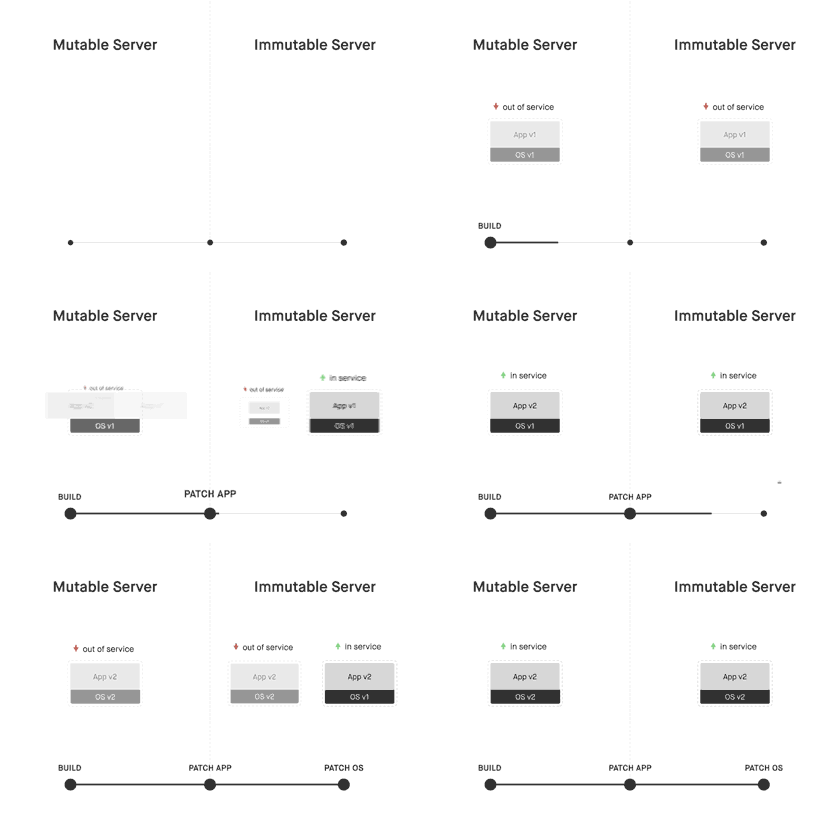
Immutable Infra allows easy server creation from a single
image, and since only thatimageneeds to be managed, management is also easy!Since the environment itself is deployed, testing in an identical environment is also easy
Still studying...
Last updated