> For the complete documentation index, see [llms.txt](https://chloe-codes1.gitbook.io/til/llms.txt). Markdown versions of documentation pages are available by appending `.md` to page URLs; this page is available as [Markdown](https://chloe-codes1.gitbook.io/til/web/javascript/05_javascript_functions.md).
# JavaScript Functions
\
### Anonymous Functions
> Functions created without a name
* Created and assigned to a variable
* The variable acts as the function's name!
* The name of a function created through a declarative function definition is also a variable pointing to the function!
\
### Function Hoisting
* In JavaScript, all declarations are hoisted
* In the case of function declarations, declaration, initialization, and assignment all occur, making execution possible
* Function expressions undergo variable hoisting resulting in undefined. In other words, they cannot be executed
\
### Array Test Functions (Callback Functions)
> Callback functions: Functions that are automatically called when a method is executed
#### Array helper methods
> Callback functions for array inspection methods
* `forEach`
* Used when manipulating elements one by one
* Passes each element to a callback function for processing
* Usage
```javascript
arr.forEach( callback(currentvalue[, index[, array]] [, thisArg]))
```
```javascript
function hiUser(element, index, array){
document.write("Hi " +element+ "!
")
}
var users = ["jerry", "tom", "steve"];
users.forEach(hiUser);
```
* `map`
* Returns a new array after processing each array element with a callback function
```javascript
function sayBabyAnmial(animal){
var result;
switch(animal){
case "dog":
result = "puppy";
break;
case "chicken":
result = "chick";
break;
default:
result = "baby " + animal;
}
return result;
}
var animals = ["cat", "dog", "squirrel", "chicken","fox"];
var baby = animasl.map(sayBabyAnimal);
```
* `filter`
* Returns a new array with desired elements organized
* Uses a callback function when organizing elements
* Arguments passed to callback functions when using array object inspection methods
1. element
2. index
3. array
```javascript
function isBigEnough(element, index, array){
return (element >= 10);
}
var filtered = [12, 5, 8, 130, 44].filter(isBigEnough);
document.write(filtered.toString()); //12,130,44
```
* `every`
* Returns **true** when all array elements pass the condition presented by the callback function, returns **false** on failure
```javascript
function isBigEnough(element, index, array){
return (element >= 10);
}
var passed = [12, 5, 8, 130, 44].every(isBigEnough); //false
var passed = [12, 54, 18, 130, 44].every(isBigEnough); //true
```
* `some`
* The logically opposite case of every
* If at least one element satisfies the callback function's requirement: returns **true**
* If none exist: returns **false**
\
### Function Scope
* JavaScript === Functional language
* Scope is set based on functions
* **Function**
: Sets its own scope
* Variables declared inside a function => Valid only inside the function
### Closure
#### First class function
* Characteristics of JavaScript functions
* Functions can be passed as arguments
* Functions can be returned
* Functions can be assigned to variables
* The conditions above are the conditions for first-class objects (first class object / first class citizen) in programming languages
* Passing a function as an argument
* Returning a function
#### Closure
: A closure is the combination of a function and the lexical environment (lexical scoping, environment) in which that function was declared
```javascript
function makeAdder() {
var x =1
return function(y){
return x+y
}''
}
var add1 =
```
* It remembers the variables that were outside even when inside!!!
\
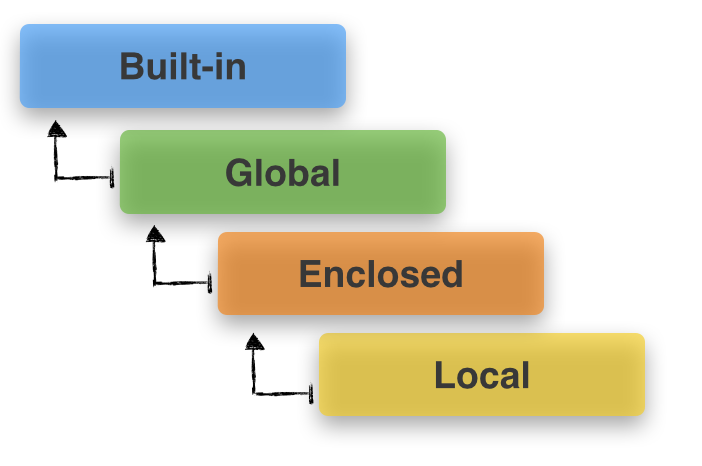
#### LEGB rule
* local
* environment
* global
* build-in